CS101 - LIVING WITH COMPUTERS			LAB

Lab 3: Introduction to DOS/Windows and e-mail

Objectives:
1) Understand the use of filenames and folders.
2) Be able to use Windows '95.
3) Be able to navigate around Windows '95 using My Computer and Windows Explorer.
4) Be able to use Windows '95 Notepad and Paint for creating and printing documents.
5) To feel more comfortable using a computer

Method:
1)  Review Getting Started with Windows '95
Most computers today come with a Graphical User Interface(GUI) like MS-Windows.  These programs require the use of windows, icons, menus and a pointing device.
- Unlike other versions of Windows, Windows '95 starts automatically. You will then see a collection of icons each representing different programs or shortcuts to programs. One of these icons is My Computer which is a graphical view of the computer and its contents. You can double-click on the C: drive to explore the harddisk and double-click on the A: drive to explore what is on your disk. You can use My Computer to find files as well as run programs.
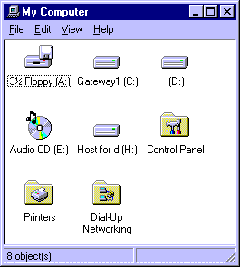
3) Each window usually has a control button in the upper left corner and minimize, maximize, and close buttons in the upper right corner. By clicking and holding-down on the title bar at the top of the window, you can drag a window around. By clicking and holding-down on the edge of a window, you can stretch and shrink the window. At the top of the window, is a menu bar containing selections for File, Edit, View, and Help.
- Another way of exploring the Windows environment is with Windows Explorer. Windows Explorer is executed by selecting it from the Programs menu by pressing the Start button.
- One of the program groups that is standard on most computers using MS-Windows is Accessories. Here you will find a simple wordprocessor WordPad or Write, a simple painting and drawing program Paint or Paintbrush, a simple text editor Notepad as well as other programs. Select Notepad from Accessories from the Programs menu by pressing the Start button. Notepad can be used for entering text, saving it to a file, retrieving it for later use and for printing.
Exercises:
- 1) Create a file with Notepad containing your name and the date. Save the file on your disk and print it.
- 2) Use Paint to create a simple picture file. Save it on your disk.
- 3) Further explore the help facility available with Windows.
- 4) Send me a brief e-mail message discussing your views of the course so far.